Audio System Symptom Troubleshooting - Disk LED does not turn ON or OFF (6 CD Changer Type)
Audio System Symptom Troubleshooting - Disk LED does not turn ON or OFF
Disk LED does not turn ON or OFF
NOTE: Verify the disc has been ejected.
| 1. | With the ignition switch ON (II), try to duplicate the symptom. Is the symptom duplicated? YES - Go to 2. NO - Operation is normal.n |
| 2. | Identify whether the LED that does not turn on or off is the green or red one; they indicated the status.
Is green indicated? YES - Go to 3. NO - Go to 4. |
| 3. | Remove the audio-HVAC-display module. Connect the No. 15 (ACC) terminal of the front printed circuit board and No. 1 terminal of the printed circuit board as shown below. Then apply the positive voltage to the No. 9 terminal of the printed circuit board 10P connector intermittently on and off to observe whether the LED will turn on and off correspondingly with the inputs of the voltage as shown in the figure.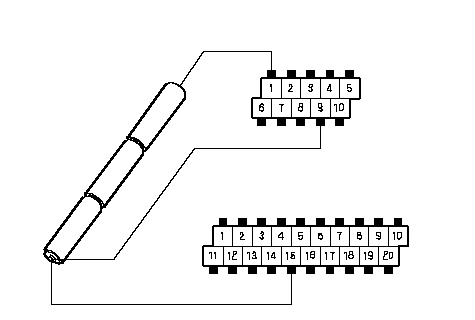 PRINTED PRINTEDCRICUT BOARD CONNECTOR (10P)GREEN-LEDON«OFFACC 5 VAUDIO- GND4.5 VPRINTED CRICUT BOARD CONNECTOR (20P) Does LED respond to the voltage input? YES - Go to 4. NO - Faulty front printed circuit board.n |
| 4. | Connect the No. 15 (ACC) terminal of the front circuit board and No. 1 terminal of the printed circuit board as shown below. Then apply the positive voltage to the No. 8 terminal of the printed circuit board 10P connector intermittently on and off to observe whether the LED will turn on and off correspondingly with the inputs of the voltage as shown in the figure.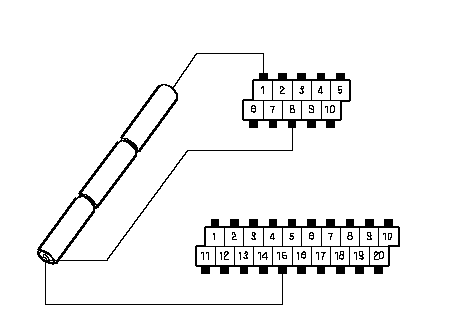 PRINTED PRINTEDCRICUT BOARD CONNECTOR (10P)RED-LEDON«OFFACC 5 VAUDIO- GND4.5 VPRINTED CRICUT BOARD CONNECTOR (20P) Does LED respond to the voltage input? YES - Faulty audio unit.n NO - Faulty front printed circuit board.n |