AUDIO AND VISUAL SYSTEM > DTC CHECK / CLEAR |
| CHECK DIAGNOSTIC CODE |
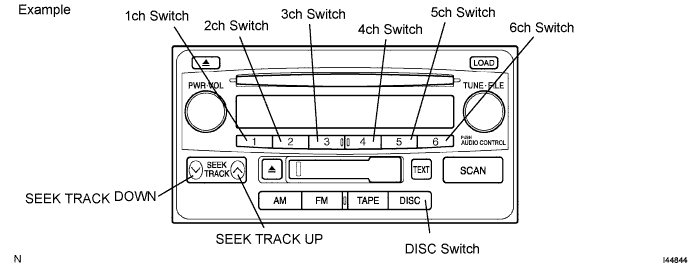
Starting diagnostic mode
Turn off the audio system and turn the ignition switch to ACC. While pressing the preset switches ''1'' and ''6'' at the same time, press the ''DISC'' switch 3 times.
Service check screen
Press the ''SEEK TRACK UP'' switch to enter the ''Service Check Screen''.
In the service check mode, the system check and diagnostic memory check are performed, and the physical address (component code) check results are displayed in the numerical order.
| Terms | Meaning |
| Physical address (component code) | Three-digit code (in hexadecimals) given to each component of AVC-LAN. Individual symbol is provided corresponding to each function. |
| Logical address | Two-digit code (in hexadecimals) given to each function and component unit in each component of AVC-LAN. |
| Code No. (physical address) | Equipment Name |
| 190 | Radio receiver assembly (audio head unit) |
Finishing diagnostic mode
Press the ''DISC'' switch for 2 seconds or more, or turn the ignition switch OFF.
Service check mode result display (for checking the current and the past system conditions)
Press the ''SEEK TRACK'' switch to see the check result of each component.
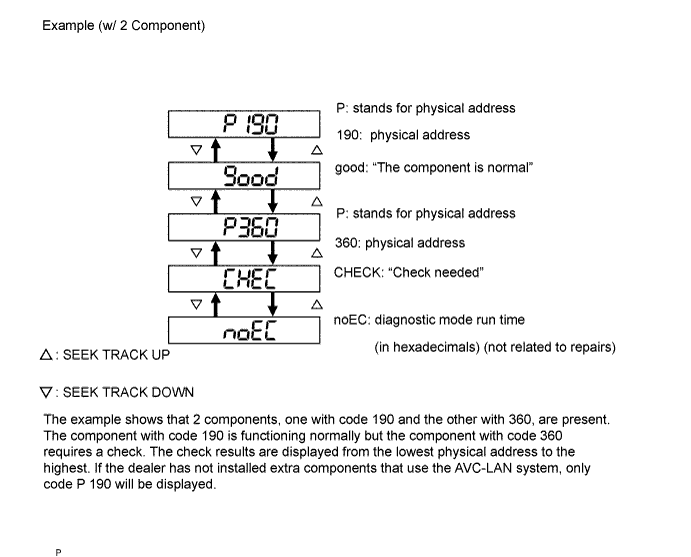
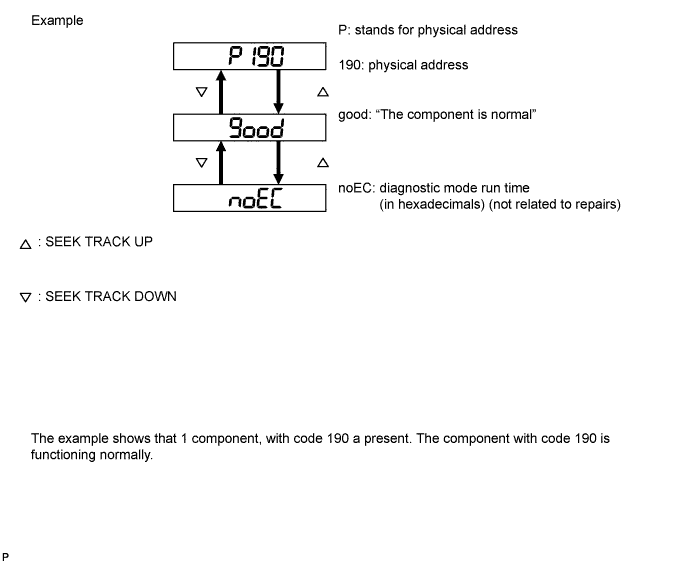
Check result display
| Display | Original Language | Meaning | Action to Be Taken |
| good | Good (normal) | No DTC are detected in both ''System Check Mode'' and ''Diagnostic Memory Mode''. | - |
| nCon | No connection | System recognized component when it was registered, but component gives no response to ''Diagnostic Mode ON Request''. | Check power source circuit and communication circuit of component indicated by component code (physical address). |
| ECHn | Exchange | One or more DTCs for ''Exchange'' are detected in either ''System Check Mode'' or ''Diagnostic Memory Mode''. | Go to detailed information mode to check trouble area on DTC list. |
| CHEC | Check | When no DTCs are detected for ''Exchange'', one or more DTCs for ''Check'' are detected in either ''System Check Mode'' or ''Diagnostic Memory Mode''. | Go to detailed information mode to check trouble area on DTC list. |
| OLd | Old version | Old DTC application is identified and DTC is detected in either ''System Check Mode'' or ''Diagnostic Memory Mode''. | - |
| nrES | No response | Device gives no response to ''System Check Result Request'' or ''Diagnostic Memory Request''. | Check power source circuit and communication circuit of component indicated by component code (physical address). |
To perform the service check again, press the preset switch ''1''.
Detailed information mode (when displaying the DTC for a trouble component)
With ''CHEC'' or ''ECHn'' being displayed, press the preset switch ''2'' to go to the detailed information mode.
Press the ''SEEK TRACK'' switch to display the ''System Check Result (SYS)'' and ''Diagnostic Memory Response (CODE)''.
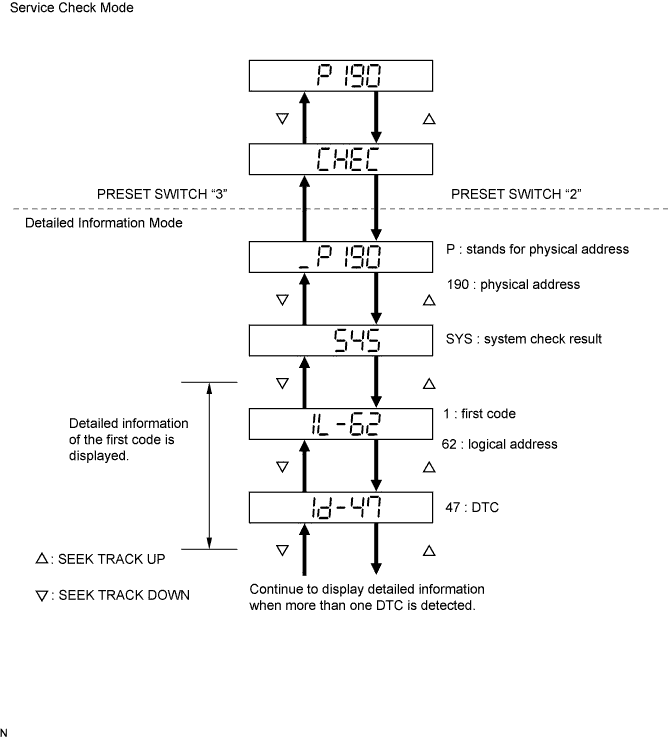
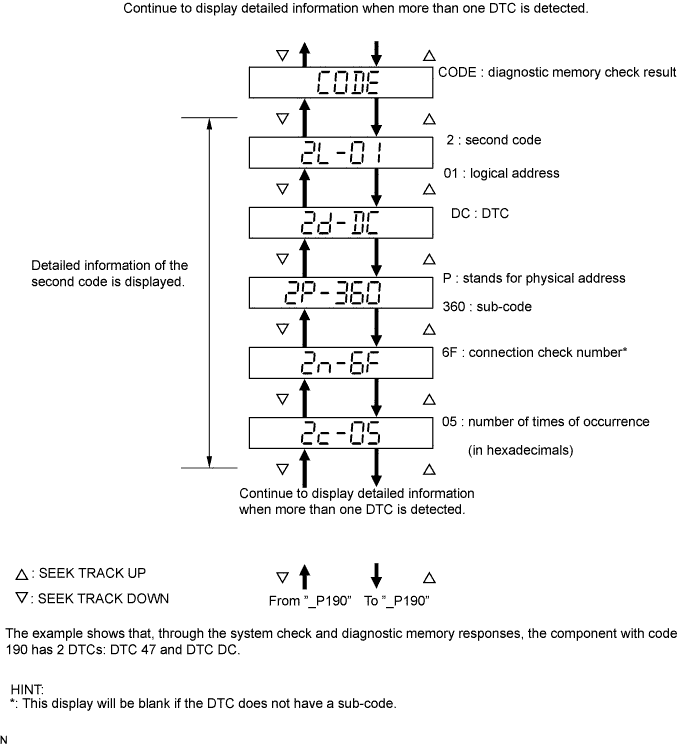
Displayed items in detailed information mode
| Division Code for DTC Display | Meaning | Order of detailed information displayed when "SEEK TRACK UP" switch is pressed (order is reversed when 'SEEK TRACK DOWN' switch is pressed) |
| SYS | System check result is displayed |
|
| CODE | Diagnostic memory check result is displayed. |
|
Check the trouble area on the DTC list.
To return to the service check mode, press the preset switch ''3''.
| CLEAR DTC |
Clearing an individual DTC from memory (when clearing memory of DTCs detected in the past individually)
Press the preset switch ''5'' for 2 seconds or more while ''ECHn'' is displayed in the service check mode or during the detailed information mode.
Clearing the entire DTC memory (when clearing memory of all DTCs detected in the past)
Start the diagnostic mode after repairing the trouble area.
Press the preset switch ''5'' for 2 seconds or more (''CLR'' is displayed at this time).
Press the preset switch ''1'' to perform the service check again, and check that no DTCs are displayed for all of the component codes (physical address).
Finishing diagnostic mode
Press the ''DISC'' switch for 2 seconds or more, or turn the ignition switch OFF.
