BRAKE PEDAL > ADJUSTMENT |
| 1. CHECK AND ADJUST BRAKE PEDAL HEIGHT |
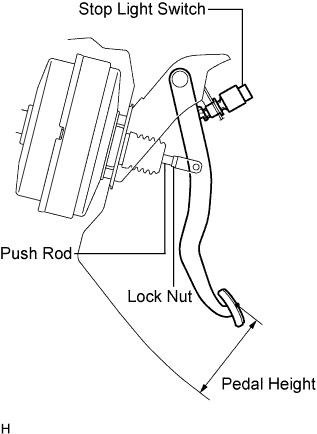 |
Check the pedal height.
| Model | Specified Condition |
| LHD (M/T) | 152.9 to 162.9 mm (6.020 to 6413 in.) |
| LHD (A/T) | 154.1 to 1164.1 mm (6.067 to 6.461 in.) |
| RHD (M/T) | 156.9 to 166.9 mm (6.177 to 6.571 in.) |
| RHD (A/T) | 158.1 to 168.1 mm (6.224 to 6.618 in.) |
Adjust the pedal height.
Disconnect the connector from the stop light switch.
Remove the switch.
Loosen the push rod clevis lock nut.
Adjust the pedal height by turning the push rod.
Tighten the lock nut.
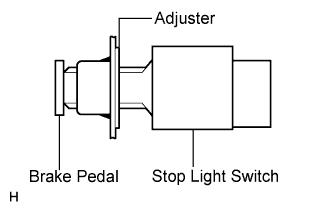 |
Insert the switch into the adjuster until it slightly touches the pedal.
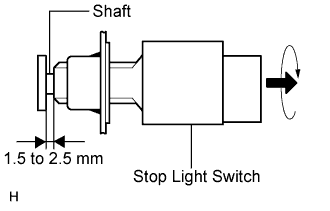 |
Turn the switch a quarter turn clockwise.
Connect the connector to the switch.
Check the switch clearance.
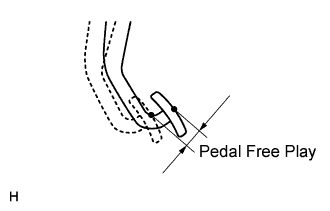
| 2. CHECK BRAKE PEDAL FREE PLAY |
 |
Stop the engine. Depress the pedal several times until there is no vacuum in the booster. Then release the pedal.
Depress the pedal until resistance is felt.
Check the pedal's free play by measuring the distance between the position in the previous step and the pedal's released position.
Check the switch clearance.
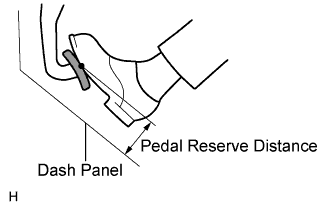
| 3. CHECK BRAKE PEDAL RESERVE DISTANCE |
 |
Release the parking brake lever. Start the engine.
Depress the pedal and check the pedal reserve distance.
Depress the pedal with a force of 490 N (50 kgf, 110 lbf).
Measure the distance between the pedal and dash panel shown in the illustration.
| Model | Specified Condition |
| LHD (2WD) | 78.0 mm (3.071 in.) |
| LHD (4WD) | 85.0 mm (3.347 in.) |
| RHD (2WD) | 82.0 mm (3.228 in.) |
| RHD (4WD) | 89.0 mm (3.504 in.) |
