SFI SYSTEM > DTC CHECK / CLEAR |
| CHECK DTC |
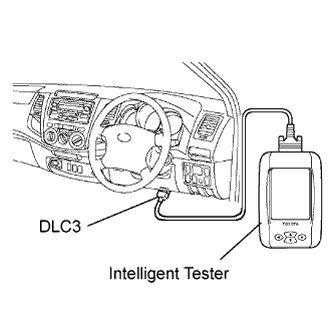 |
Connect the intelligent tester to the DLC3.
Turn the ignition switch ON and turn the tester ON.
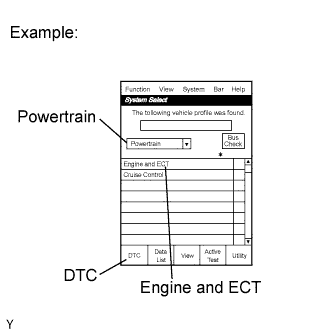 |
Enter the following menus: Enter / Powertrain / Engine and ECT / DTC.
Check and make a note of DTC(s) and freeze frame data.
Confirm the details of the DTC(s) (Click here).
| FREEZE FRAME DATA |
Connect the intelligent tester to the DLC3.
Turn the ignition switch ON and turn the tester ON.
Enter the following menus: Powertrain / Engine and ECT / DTC.
Select a parameter to check using the freeze frame data.
Note the DTC(s) and freeze frame data.
| CLEAR DTC AND FREEZE FRAME DATA (using the intelligent tester) |
 |
Connect the intelligent tester to the DLC3.
Turn the ignition switch ON (do not start the engine) and turn the tester ON.
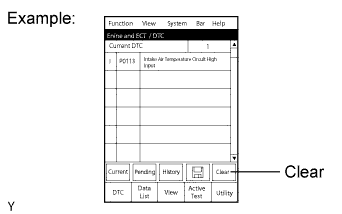
Enter the following menus: Powertrain / Engine and ECT / DTC / Clear.
Erase DTCs and freeze frame data by pressing the YES button on the tester.
| CLEAR DTCs AND FREEZE FRAME DATA (not using the intelligent tester) |
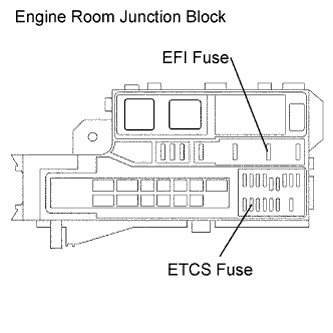 |
Remove the EFI and ETCS fuses from the engine room junction block for more than 60 seconds, or disconnect the battery cable for more than 60 seconds. When disconnecting the battery cable, perform the "INITIALIZE" procedure.
A750E: Refer to the Initialization (Click here).
A750F: Refer to the Initialization (Click here).
