ANTI-LOCK BRAKE SYSTEM > DTC CHECK / CLEAR |
| CHECK DTC (When not using intelligent tester:) |
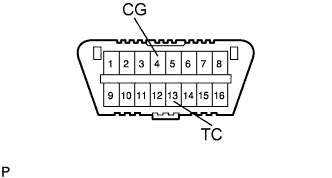 |
Using SST, connect terminals 13 (TC) and 4 (CG) of the DLC3.
Turn the ignition switch ON.
Read the DTC from the ABS warning light on the combination meter.
| Trouble Area | See page |
| TC terminal circuit |
Click here
|
| ABS warning light circuit |
Click here
|
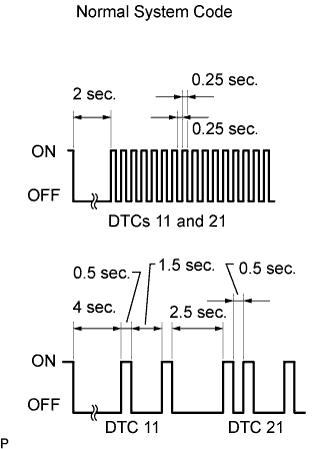 |
After completing the check, disconnect terminals 13 (TC) and 4 (CG) of the DLC3, and turn off the display.
| CHECK DTC (When using intelligent tester:) |
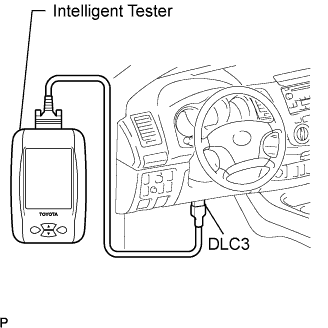 |
Connect the intelligent tester to the DLC3.
Turn the ignition switch ON.
Read the DTCs by following the prompts on the tester screen.
| CLEAR DTC (When not using intelligent tester:) |
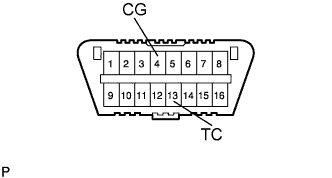 |
Using SST, connect terminals 13 (TC) and 4 (CG) of the DLC3.
Turn the ignition switch ON.
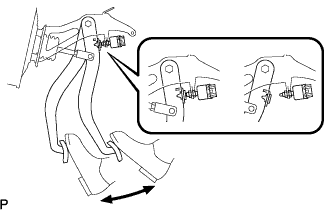 |
Clear the DTCs stored in the ECU by depressing the brake pedal 8 times or more within 5 seconds.
Check that the ABS warning light displays the normal system code.
Remove SST from the terminals of the DLC3.
| CLEAR DTC (When using intelligent tester:) |
|
Connect the intelligent tester to the DLC3.
Turn the ignition switch ON.
Operate the intelligent tester to erase the codes.
| CHECK ABS WARNING LIGHT |
Turn the ignition switch ON.
Check that the ABS warning light illuminates and then turns off in approximately 3 seconds.
