CRANKSHAFT POSITION SENSOR > INSTALLATION |
| 1. INSTALL CRANKSHAFT POSITION SENSOR |
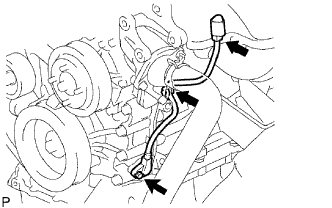 |
Apply a light coat of engine oil to the O-ring of the sensor.
Install the sensor with the bolt.
Install the connector to the connector bracket.
Attach the harness clamp.
Connect the sensor connector.
| 2. INSTALL NO. 1 COMPRESSOR MOUNTING BRACKET |
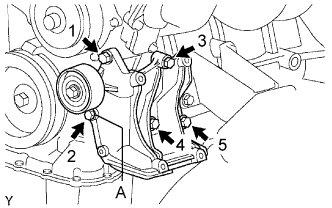 |
Temporarily install the mounting bracket with the 5 bolts.
Install the mounting bracket by tightening the 5 bolts in the order shown in the illustration.
| 3. INSTALL COOLER COMPRESSOR ASSEMBLY |
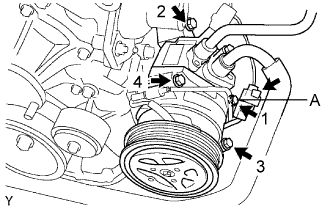 |
Temporarily install the compressor with the bolt labeled A.
Install the compressor completely by tightening the 4 bolts in the order shown in the illustration.
Connect the compressor connector.
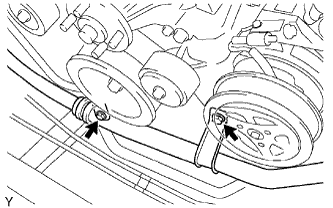 |
Install the suction hose with the 2 bolts.
| 4. INSTALL DRIVE BELT |
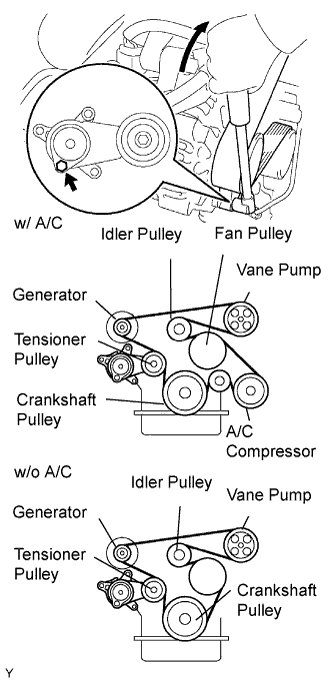 |
Install the drive belt to the pulleys except the drive belt tensioner pulley.
Use the hexagon-shaped part indicated by the arrow in the illustration to move the tensioner pulley downward and then install the drive belt to the tensioner pulley.
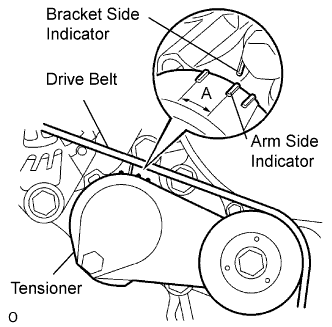 |
After a new belt has been installed, check that the tensioner indicator mark is within range A shown in the illustration.
| 5. CONNECT CABLE TO NEGATIVE BATTERY TERMINAL |
| 6. PERFORM INITIALIZATION |
Perform initialization (Click here).
