REMOVAL AND INSTALLATION


warning
  • Disconnect the negative battery terminal and wait for 60 seconds or more before starting work. Furthermore, the disconnected battery terminal should be covered with tape to insulate it.
  • Never attempt to disassemble or repair the SRS-ECU. If faulty, replace it.
  • When the SRS-ECU is replaced, initialise the SRS-ECU.
  • Do not drop or subject the SRS-ECU to impact or vibration. If denting, cracking, deformation, or rust are discovered in the SRS-ECU, replace it with a new SRS-ECU. Discard the old one.
  • After deployment of an air bag, replace the SRS-ECU with a new one.
  • Never use an ohmmeter on or near the SRS-ECU, and use only the special test equipment described on .

Pre-removal Operation
  • Turn the ignition switch to the "LOCK" (OFF) position.
  • Disconnect the Negative Battery Terminal.


Removal steps


·
Console side cover (Refer to GROUP 52A, Instrument panel assembly ).
<<A>>

1.
Connector


2.
SRS-ECU


Installation steps

>>A<<
2.
SRS-ECU


1.
Connector


·
Console side cover (Refer to GROUP 52A, Instrument panel assembly ).


·
Negative battery cable connection

>>B<<
·
Post-installation inspection

REMOVAL SERVICE POINTS


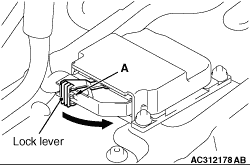
<<A>> CONNECTOR REMOVAL


As shown in the figure, while pressing on A, release the lock lever and remove the connector.

INSTALLATION SERVICE POINTS


>>A<< SRS-ECU INSTALLATION


warning The SRS may not activate if SRS-ECU is not installed properly.
1.Install the SRS-ECU
warning Be sure to initialise SRS-ECU to get normal operation of the SRS air bag.
2.When the SRS-ECU is replaced, initialise the SRS-ECU in the following way.
(1) Click on STV.
(2) Click on the car icon to select model and click V after select model.
(3) Click on SRS-AIR BAG.
(4) Click on special Function.
(5) Click on SRS ECU Initialisation.
(6) Click on V.

>>B<< POST-INSTALLATION INSPECTION


1.Connect the negative battery cable.
2.Turn the ignition key to “ON” position.

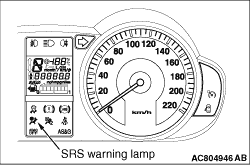
3.Does the "SRS" warning lamp illuminate for approximately seven seconds, and go out?
4.If no, refer to troubleshooting (Refer to .