Emblem/Sticker Replacement
Emblem/Sticker Replacement
NOTE: When removing the emblem/sticker, take care not to scratch the body.| 1. | To remove the front ‘‘H'' emblem, remove the front grille. |
| 2. | To remove the rear ‘‘H'' emblem, remove the rear license trim. |
| 3. | Clean the body surface with a sponge dampened in alcohol. After cleaning, keep oil, grease, and water from getting on the surface. |
| 4. | Apply the emblem/sticker, where shown.
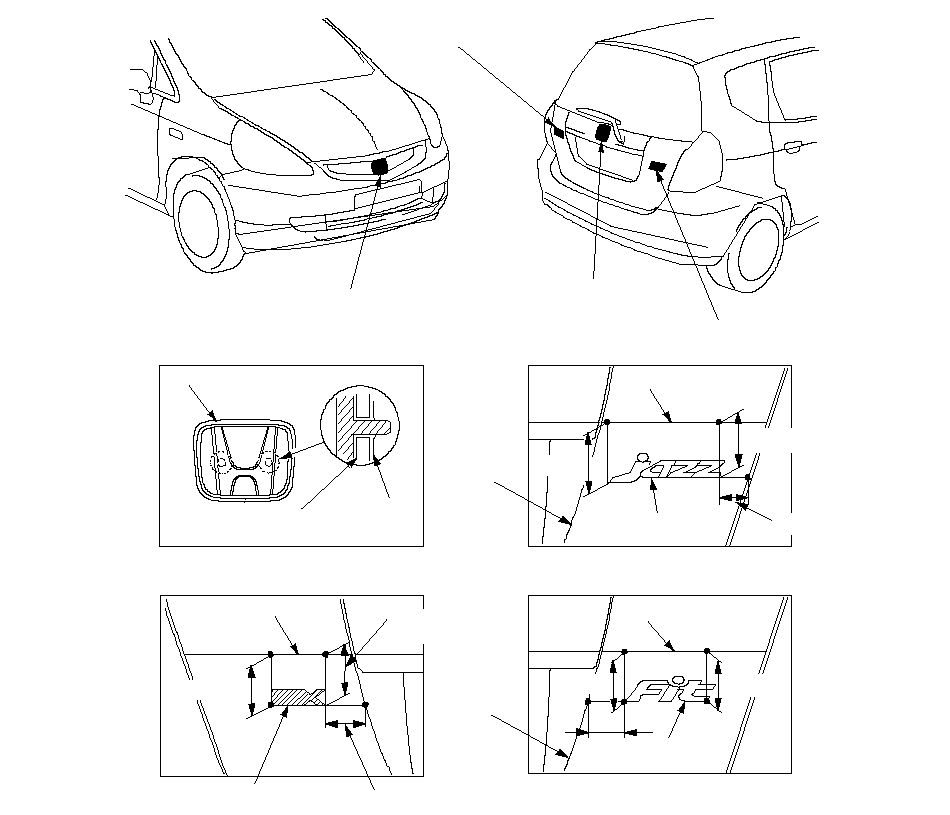 VERSION EMBLEM VERSION EMBLEM(For some models)FRONT ''H'' EMBLEMREAR ''H'' EMBLEMJAZZ/Fit EMBLEMBody line.67.5 (2.66)VERSION EMBLEMUnit: mm (in.)FRONT/REAR ''H'' EMBLEMFRONT GRILLE/REAR LICENSE TRIMPUSH NUTBody line.Body line.75 (3.0)JAZZ EMBLEM70 (2.76)45 (1.8)59 (2.3)70 (2.8)Body line.Fit EMBLEMBody line.70 (2.8)70 (2.8)70 (2.8) |
| 5. | After installing the front ‘‘H'' emblem, reinstall the front grille to the front bumper, and reinstall the front bumper. |
| 6. | After installing the rear ‘‘H'' emblem, reinstall the rear license trim. |