DTC Troubleshooting: P0718 (15)

DTC P0718:
 Input Shaft (Mainshaft) Speed Sensor Intermittent Failure
NOTE:
  • Before you troubleshoot, record all freeze data and any on-board snapshot with the HDS, and review General Troubleshooting Information.
  • This code is caused by an electrical circuit problem and cannot be caused by a mechanical problem in the transmission.
R20A3 Engine Model
  1. Turn the ignition switch to ON (II).
  1. Clear the DTC with the HDS.
  1. Test-drive the vehicle at speeds over 20 km/h (12 mph) with the shift lever in D, and let the transmission shift through all five gears.
  1. Monitor the OBD STATUS for P0718 in the DTCs MENU with the HDS.
Does the HDS indicate FAILED?
YES -
Go to Step 5 .
NO -
If the HDS indicates PASSED, intermittent failure, the system is OK at this time. Check for poor connections or loose terminals between the input shaft (mainshaft) speed sensor and the PCM. If the HDS indicates NOT COMPLETED, go to Step 3 .
  1. Turn the ignition switch to LOCK (0).
  1. Disconnect the input shaft (mainshaft) speed sensor connector, and inspect the connector and connector terminals to be sure they are making good contact.
Are the connector terminals OK?
YES -
Go to Step 7 .
NO -
Repair the connector terminals, then go to Step 7 .
  1. Connect the input shaft (mainshaft) speed sensor connector.
  1. Test-drive the vehicle at speeds over 20 km/h (12 mph) with the shift lever in D, and let the transmission shift through all five gears.
  1. Monitor the OBD STATUS for P0718 in the DTCs MENU with the HDS.
Does the HDS indicate FAILED?
YES -
Go to Step 10 .
NO -
If the HDS indicates PASSED, troubleshooting is complete. If the HDS indicates NOT COMPLETED, go to Step 8 .
  1. Turn the ignition switch to LOCK (0).
  1. Jump the SCS line with the HDS.
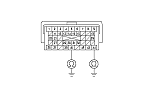
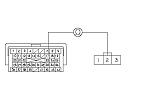
  1. Disconnect PCM connector C (44P).
  1. Check for continuity between PCM connector terminal C40 and body ground, and between terminal C44 and body ground.
Is there continuity?
YES -
Go to Step 14 .
NO -
  1. Connect PCM connector C (44P).
  1. Disconnect the input shaft (mainshaft) speed sensor connector.
  1. Turn the ignition switch to ON (II).

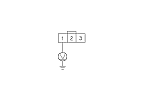
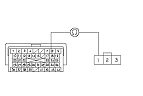
  1. Measure the voltage between input shaft (mainshaft) speed sensor connector terminal No. 1 and body ground.
Is there about 5 V?
YES -
Go to Step 18 .
NO -
Go to Step 29 .
  1. Turn the ignition switch to LOCK (0).
  1. Jump the SCS line with the HDS.
  1. Disconnect PCM connector B (44P).

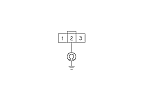
  1. Check for continuity between input shaft (mainshaft) speed sensor connector terminal No. 2 and body ground.
Is there continuity?
YES -
Repair short to body ground in the wire between PCM connector terminal B17 and the input shaft (mainshaft) speed sensor, then go to Step 32 .
NO -
Go to Step 22 .
  1. Connect PCM connector B (44P).
  1. Turn the ignition switch to ON (II).

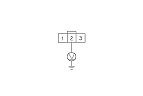
  1. Measure the voltage between input shaft (mainshaft) speed sensor connector terminal No. 2 and body ground.
Is there about 5 V?
YES -
NO -
Go to Step 25 .
  1. Turn the ignition switch to LOCK (0).
  1. Jump the SCS line with the HDS.
  1. Disconnect PCM connector B (44P).

  1. Check for continuity between PCM connector terminal B17 and input shaft (mainshaft) speed sensor connector terminal No. 2.
Is there continuity?
YES -
Go to Step 38 .
NO -
Repair open in the wire between PCM connector terminal B17 and the input shaft (mainshaft) speed sensor, then go to Step 32 .
  1. Turn the ignition switch to LOCK (0).
  1. Disconnect PCM connector B (44P).

  1. Check for continuity between PCM connector terminal B18 and input shaft (mainshaft) speed sensor connector terminal No. 1.
Is there continuity?
YES -
Go to Step 38 .
NO -
Repair open in the wire between PCM connector terminal B18 and the input shaft (mainshaft) speed sensor, then go to Step 32 .
  1. Reconnect all connectors.
  1. Turn the ignition switch to ON (II).
  1. Clear the DTC with the HDS.
  1. Test-drive the vehicle at speeds over 20 km/h (12 mph) with the shift lever in D, and let the transmission shift through all five gears.
  1. Check for Temporary DTCs or DTCs with the HDS.
Is DTC P0718 indicated?
YES -
Check for poor connections or loose terminals between the input shaft (mainshaft) speed sensor and the PCM, then go to Step 1 .
NO -
Go to Step 37 .
  1. Monitor the OBD STATUS for P0718 in the DTCs MENU with the HDS.
Does the HDS indicate PASSED?
YES -
Troubleshooting is complete. If any other Temporary DTCs or DTCs were indicated in Step 36 , go to the indicated DTC's troubleshooting.■
NO -
If the HDS indicates FAILED, check for poor connections or loose terminals between the input shaft (mainshaft) speed sensor and the PCM, then go to Step 1 . If the HDS indicates NOT COMPLETED, go to Step 35 .
  1. Reconnect all connectors.
  1. Test-drive the vehicle at speeds over 20 km/h (12 mph) with the shift lever in D, and let the transmission shift through all five gears.
  1. Check for Temporary DTCs or DTCs with the HDS.
Is DTC P0718 indicated?
YES -
Check for poor connections or loose terminals between the input shaft (mainshaft) speed sensor and the PCM. If the PCM was updated, substitute a known-good PCM, then go to Step 40 . If the PCM was substituted, go to Step 1 .
NO -
Go to Step 42 .
  1. Monitor the OBD STATUS for P0718 in the DTCs MENU with the HDS.
Does the HDS indicate PASSED?
YES -
If the PCM was updated, troubleshooting is complete. If the PCM was substituted, replace the original PCM. If any other Temporary DTCs or DTCs were indicated in Step 41 , go to the indicated DTC's troubleshooting.■
NO -
If the HDS indicates FAILED, check for poor connections or loose terminals between the input shaft (mainshaft) speed sensor and the PCM. If the PCM was updated, substitute a known-good PCM, then go to Step 40 . If the PCM was substituted, go to Step 1 . If the HDS indicates NOT COMPLETED, go to Step 40 .