Cylinder Head Valve Clearance Adjustment

NOTE: Adjust the valves only when the cylinder head temperature is less than 38 °C (100 °F).
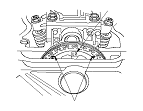
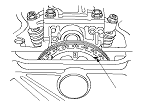
  1. Set the No. 1 piston at top dead center (TDC). The ‘‘UP'' mark (A) on the camshaft sprocket should be at the top, and the TDC grooves (B) on the camshaft sprocket should line up with the top edge of the head.

  1. Select the correct thickness feeler gauge for the valves you are going to check.
    Valve Clearance
    Intake:
    0.18−0.22 mm (0.007−0.009 in.)
    Exhaust:
    0.23−0.27 mm (0.009−0.011 in.)


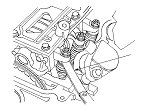
  1. Insert the feeler gauge (A) between the adjusting screw and the end of the valve stem on No. 1 cylinder and slide it back and forth; you should feel a slight amount of drag.

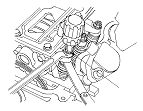
  1. If you feel too much or too little drag, loosen the locknut, and turn the adjusting screw (A) until the drag on the feeler gauge is correct.
  1. Tighten the locknut and recheck the clearance. Repeat the adjustment, if necessary.
  1. Tighten the locknut to the specified torque, and recheck the valve clearance. Repeat the adjustment if necessary.
    Specified Torque
    7 x 0.75 mm 14 N·m (1.4 kgf·m, 10 lbf·ft)
    Apply new engine oil to the nut threads.


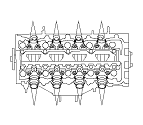
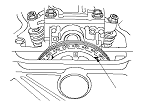
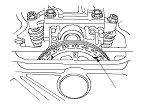
  1. Rotate the crankshaft clockwise. Align the No. 3 piston TDC groove (A) on the camshaft sprocket with the top edge of the head.
  1. Check, and if necessary, adjust the valve clearance on the No. 3 cylinder.

  1. Rotate the crankshaft clockwise. Align the No. 4 piston TDC groove (A) on the camshaft sprocket with the top edge of the head.
  1. Check, and if necessary, adjust the valve clearance on the No. 4 cylinder.

  1. Rotate the crankshaft clockwise. Align the No. 2 piston TDC groove (A) on the camshaft sprocket with the top edge of the head.
  1. Check, and if necessary, adjust the valve clearance on the No. 2 cylinder.
  1. Turn the ignition switch to ON (II).
  1. Select BODY ELECTRICAL with the HDS.
  1. Select ADJUSTMENT in GAUGE MENU with the HDS.
  1. Select SERVICE REMINDER in the EU MAINTENANCE MINDER with the HDS.
  1. Select SERVICE REMINDER ITEM 9 with the HDS.