A/T Gear Position Indicator Panel Light Harness Replacement

RHD Model
NOTE: The A/T gear position indicator panel light, the park pin switch, and the shift lock solenoid harness are not available separately. Replace the A/T gear position indicator panel light, the park pin switch, and the shift lock solenoid harness as a set.
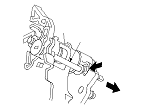
  1. Release the lock (A) of the shift lock release extension (B), then remove the shift lock release extension.

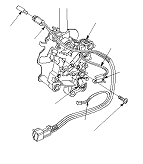
  1. Remove the harness wire ties (A), and remove the screw (B) securing the park pin switch (C), and remove the light bulb (D) from the socket.
  1. Remove the A/T gear position indicator panel light harness (E), the park pin switch harness (F), and the shift lock solenoid harness (G) from the harness guide, replace it.
  1. Apply non-hardening thread lock sealant to the screw threads. Install a new park pin switch, and secure the park pin switch with the screw.
  1. Tie the harnesses of the A/T gear position indicator panel light harness, the park pin switch harness and the shift lock solenoid harness at the guide with new harness wire ties.
  1. Install the A/T gear position indicator panel light bulb in the socket.

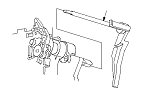
  1. Install the shift lock release extension (A).

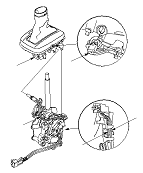
  1. Install the A/T gear position indicator panel base (A) on the shift lever bracket.
    NOTE: Take care not to pinch the harnesses.
  1. Route the A/T gear position indicator panel light harness (B), the park pin switch harness (C), and the shift lock solenoid harness. Take a slack out of the harnesses, and secure the harnesses with at the harness guide.
  1. Install the A/T gear position indicator panel light socket (D) in the panel base.