DTC Troubleshooting: B1029

DTC B1029:
 Ultrasonic Signal Error
  1. Clear the DTCs with the HDS.
  1. Turn the ignition switch to LOCK (0) and then back to ON (II).
  1. Check for DTCs with the HDS.
Is DTC B1029 indicated?
YES -
Go to Step 4 .
NO -
Intermittent failure, the system is OK at this time.■
  1. Do the ultrasonic sensor input test, and check power supply and ground for ultrasonic sensor.
Do all of the input tests prove OK?
YES -
Go to Step 5 .
NO -
If any input tests indicate a problem, find and correct them, then recheck the system.■
  1. Do the alarm control siren input test, and check power supply and ground for alarm control siren.
Do all of the input tests prove OK?
YES -
Go to Step 6 .
NO -
If any input tests indicate a problem, find and correct them, then recheck the system.■
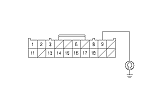
  1. Disconnect driver's under-dash fuse/relay box connector Q (20P).
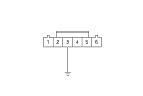
  1. Connect the alarm control siren 6P connector No. 3 terminal and body ground with a jumper wire.

  1. Check for continuity between driver's under-dash fuse/relay box connector Q (20P) No. 9 terminal and body ground.
Is there continuity?
YES -
Go to Step 9 .
NO -
Repair an open in the wire between the driver's MICU and the alarm control siren.■
  1. Disconnect the jumper wire from the alarm control siren 6P connector.

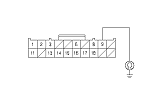
  1. Check for continuity between driver's under-dash fuse/relay box connector Q (20P) No. 9 terminal and body ground.
Is there continuity?
YES -
Repair a short to ground in the wire.■
NO -
Faulty alarm control siren, replace it.■