|
DTC U0199:
Driver's MICU Lost Communication with Door Multiplex Control Unit
-
Clear the DTCs with the HDS.
-
Turn the ignition switch to LOCK (0) and then back to ON (II).
-
Wait for 6 seconds or more.
-
Check for DTCs with the HDS.
|
YES
|
-
|
|
|
NO
|
-
|
Intermittent failure, the system is OK at this time. Check for loose or poor connections.■
|
-
Check for DTCs with the HDS.
|
YES
|
-
|
Go to the DTC U1280 troubleshooting.■
|
|
NO
|
-
|
|
-
Turn the ignition switch to LOCK (0).
-
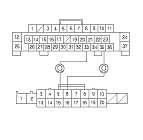
Disconnect the door multiplex control unit 37P connector.
-
Disconnect driver's under-dash fuse/relay box connector P (20P).
-
Check for continuity between door multiplex control unit 37P connector No. 33 and No. 35 terminals and driver's under-dash fuse/relay box connector P (20P) No. 5 and No. 6 terminals individually.
|
YES
|
-
|
|
|
NO
|
-
|
An open in the wire.■
|
|