|
DTC B1129:
Driver's Door Lock Knob Switch Signal Error (LOCK/UNLOCK)
-
Clear the DTCs with the HDS.
-
Turn the ignition switch to LOCK (0) and then back to ON (II).
-
Operate the driver's door lock knob switch several times.
-
Check for DTCs with the HDS.
|
YES
|
-
|
|
|
NO
|
-
|
Intermittent failure, the system is OK at this time. Check for loose or poor connections.■
|
-
Select KEYLESS from the BODY ELECTRICAL menu, and enter the DATA LIST.
-
Check the ON/OFF information of the DRIVER'S DOOR LOCK KNOB SWITCH (LOCK) and the DRIVER'S DOOR LOCK KNOB SWITCH (UNLOCK).
|
Is the DRIVER'S DOOR LOCK KNOB SWITCH (LOCK) information indicator ON and the DRIVER'S DOOR LOCK KNOB SWITCH (UNLOCK) information indicator OFF with the driver's door lock knob switch in LOCK position, and is the DRIVER'S DOOR LOCK KNOB SWITCH (LOCK) information indicator OFF and the DRIVER'S DOOR LOCK KNOB SWITCH (UNLOCK) information indicator ON with the driver's door lock knob switch in UNLOCK position?
|
-
Disconnect the driver's door lock actuator 10P connector.
-
Check the ON/OFF information of the DRIVER'S DOOR LOCK KNOB SWITCH (LOCK) and DRIVER'S DOOR LOCK KNOB SWITCH (UNLOCK) in the DATA LIST.
|
Are both information indicators OFF?
|
-
Turn the ignition switch to LOCK (0).
-
Disconnect the door multiplex control unit 37P connector.
-
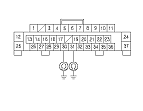
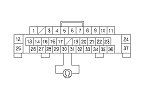
Check for continuity between body ground and the door multiplex control unit 37P connector No. 30 and No. 31 terminals.
|
YES
|
-
|
Repair a short to ground in the wire.■
|
|
NO
|
-
|
|
-
Turn the ignition switch to LOCK (0).
-
Disconnect the door multiplex control unit 37P connector.
|