|
DTC B1127:
Driver's Door Key Cylinder Switch Signal Error (LOCK/UNLOCK)
-
Clear the DTCs with the HDS.
-
Turn the ignition switch to LOCK (0) and then back to ON (II).
-
Insert the ignition key into the driver's door key cylinder switch, and turn the key to the LOCK and UNLOCK positions 10 times.
-
Check for DTCs with the HDS.
|
YES
|
-
|
|
|
NO
|
-
|
Intermittent failure, the system is OK at this time. Check for loose or poor connections.■
|
-
With the driver's door key cylinder in the neutral position, select KEYLESS with the HDS, and enter the DATA LIST.
-
Check the ON/OFF information of the DRIVER'S DOOR KEY CYLINDER SWITCH (LOCK) and DRIVER'S DOOR KEY CYLINDER SWITCH (UNLOCK) in the DATA LIST.
|
Are both information indicators OFF?
|
-
Disconnect the driver's door lock actuator 10P connector.
-
Check the ON/OFF information of the DRIVER'S DOOR KEY CYLINDER SWITCH (LOCK) and DRIVER'S DOOR KEY CYLINDER SWITCH (UNLOCK) in the DATA LIST.
|
Are both information indicators OFF?
|
|
YES
|
-
|
Faulty
driver's door key cylinder switch
; replace the driver's door lock actuator.■
|
|
NO
|
-
|
|
-
Turn the ignition switch to LOCK (0).
-
Disconnect the door multiplex control unit 37P connector.
-
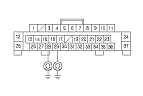
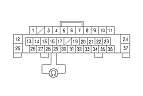
Check for continuity between body ground and the door multiplex control unit 37P connector No. 28 and No. 29 terminals.
|
YES
|
-
|
Repair a short to ground in the wire.■
|
|
NO
|
-
|
|
-
Turn the ignition switch to LOCK (0).
-
Disconnect the driver's door lock actuator 10P connector.
-
Disconnect the door multiplex control unit 37P connector.
|