|
DTC 2605:
H/D Diag: Connect
NOTE:
-
Check the vehicle battery condition first.
-
Check for B-CAN DTCs and resolve them before troubleshooting.
-
-
When Soft Error of the Hard Error/Soft Error in the Error History menu is displayed in yellow, select Save first before selecting Clear.
-
When abnormalities are in air conditioning, do the aircon system troubleshooting performed previously.
-
-
Turn the ignition switch to LOCK (0), and then back ON (II).
-
|
Is Hard Error 2601 indicated?
|
|
YES
|
-
|
Do the 2601 troubleshooting.
|
|
NO
|
-
|
|
-
-
Select the System Links.
|
YES
|
-
|
|
|
NO
|
-
|
Intermittent failure, the system is OK at this time.■
|
-
Turn the ignition switch to LOCK (0).
-
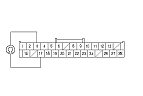
Check for poor connections or loose terminals at audio unit connector D (14P), USB adapter unit connector A (14P), and navigation display unit connector 28P.
|
Are there connections OK?
|
-
Disconnect audio unit connector D (14P), and navigation display unit connector 28P.
-
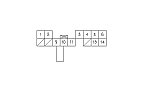
Connect the audio unit connector D (14P) terminals No. 9 and No. 10 with a jumper wire.
|
|