DTC Troubleshooting: 1701, 2608
DTC 1701:
Rear Camera Error
DTC 2608:
Rear Camera Diag
NOTE:
Check the vehicle battery condition first.
Before you troubleshoot, make sure to follow the general troubleshooting information.
Clear the hard error code.
Turn the ignition switch to LOCK (0), and then back to ON (II).
Go into the Diagnostic Menu and select the Self-Diagnosis Mode in the Select Diagnosis Items menu.
Check the System Links.
Is the Rear camera icon red?
YES
-
Go to
Step 5
.
NO
-
Intermittent failure, the system is OK at this time.■
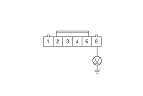
Check for poor connection or loose terminal at rearview camera 6P connector.
Are there connection OK?
YES
-
Go to
Step 6
.
NO
-
Repair poor connection or loose terminal.■
Turn the ignition switch to LOCK (0).
Disconnect rearview camera 6P connector.
Turn the ignition switch to ON (II).
Measure the voltage between rearview camera 6P connector terminal No. 6 and body ground individually.
Is there voltage about 3.0 V?
YES
-
Replace the rearview camera.
■
NO
-
Go to
Step 10
.
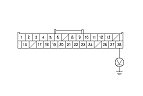
Measure the voltage between navigation display unit 28P connector terminal No. 28 and body ground individually.
Is there voltage about 3.0 V?
YES
-
Repair open in the wire between the navigation display unit and rearview camera.■
NO
-
Replace the navigation display unit.
■