|
DTC U0131:
Gauge Control Module Lost Communication with EPS Control Unit (EPS message)
-
Clear the DTCs with the HDS.
-
Turn the ignition switch to LOCK (0) and then back to ON (II).
-
Wait for 6 seconds or more.
-
Check for DTCs with the HDS.
|
YES
|
-
|
|
|
NO
|
-
|
Intermittent failure, the system is OK at this time. Check for loose or poor connections.■
|
-
Check for EPS DTCs with the HDS.
|
YES
|
-
|
Go to the indicated DTC's troubleshooting, then recheck.
|
|
NO
|
-
|
|
-
Turn the ignition switch to LOCK (0).
-
Disconnect the gauge control module 32P connector.
-
Disconnect the EPS control unit 28P connector.
-
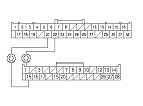
Check for continuity between the gauge control module 32P connector No. 21 and No. 22 terminals and the EPS control unit 28P connector No. 1 and No. 15 terminals respectively.
|
YES
|
-
|
Substitute a known-good EPS control unit, and recheck. If the indication goes away, replace the original EPS control unit. If the DTC is still present,
replace the gauge control module.
■
|
|
NO
|
-
|
Repair an open in the wire.■
|
|