How to Troubleshoot the EPS

System Indicator
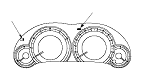
This system has one (without LKAS (Lane Keep Assist System)) or two (with LKAS) indicators.
  • EPS indicator (A)
  • LKAS indicator (with LKAS) (B)

EPS Indicator
Under normal conditions, the EPS indicator comes on when the ignition switch is turned to ON (II) position, then goes off after the engine is started. This indicates that the LED and its circuit are operating correctly.
If there is a failure in the system after the engine is started, the EPS indicator will stay on, and the power assist is turned off or restricted.
When the EPS indicator comes on, the control unit memorizes the DTC. In this case, the control unit will not activate the EPS system after the engine starts again, but it keeps the EPS indicator on.
When DTC 51-01, 51-02 or 51-06 is stored in the control unit, the EPS indicator will stay on until the DTC is erased. When a problem is detected and the EPS indicator comes on, there are cases when the indicator stays on until the ignition switch is turned to LOCK (0), and cases when the indicator goes off automatically when the system returns to normal. Even though the system is operating normally, the EPS indicator will come on under the following conditions:
  • The vehicle speed decreases abruptly from 20 km/h (12 mph) or more (by applying the brakes), and it is less than 1 km/h (1 mph) and engine speed is 1,650 rpm (min −1 ) (after the engine starts within 5 minutes: 2,150 rpm (min −1 )) or above for 5 seconds (continuously) after the abrupt deceleration.
  • While turning the steering wheel with the vehicle speed of 0 km/h (0 mph) or less for 20 seconds (continuously), and the engine speed is 1,650 rpm (min −1 ) or above for at least 10 seconds.
  • When the engine speed is 500 rpm (min −1 ) or less, and the vehicle is traveling at a speed of 10 km/h (6 mph) or more for about 3 seconds (continuously).
To determine the actual cause of the problem, question the customer about the conditions during which the problem occured, taking the above conditions into consideration.

LKAS (Lane Keep Assist System) Indicator
This EPS system is added to the LKAS. When the LKAS related problem is detected, LKAS indicator (orange) will come on. However, when the EPS control is failed while the LKAS control is activated, LKAS indicator (orange) will also come on. In this case, EPS indicator will not come on, but the EPS control unit memorizes the DTC. If LKAS indicator (orange) comes on, it deactivates the LKAS control. The power assist works as an usual after deactivating LKAS, but it may stop the power assist depending on the detected malfunction.

Diagnostic Trouble Code (DTC)
  • If the CPU cannot be activated, or it fails, the EPS indicator comes on, but the DTC is not memorized.
  • The memory can hold any number of DTCs. However, when the same DTC is detected more than once, the most recent DTC is written over the prior DTC, therefore only one occurence is memorized.
  • The lowest DTC is indicated first. The DTCs are indicated in ascending order, not in the order that they occurred.
  • The DTCs are memorized in the EEPROM (non-volatile memory) therefore the memorized DTCs cannot be erased by disconnecting the battery. Perform the specified procedures to clear DTCs.

Self-diagnosis
Self-diagnosis can be classified into three categories:
  • Initial diagnosis: Done right after the engine starts and until the EPS indicator goes off.
  • Regular diagnosis: Done right after the initial diagnosis until the ignition switch is turned to LOCK (0).
  • Steering diagnosis: Done during regular diagnosis while turning the steering wheel.
The EPS control unit performs the following functions when a problem is detected by self-diagnosis:
  1. Turns on the EPS indicator.
  1. Memorizes the DTC.
  1. Stops or restricts the power assist and manual steering operation resumes.
    NOTE: For DTCs 11-01, 11-02, 12-01, 21-01, 21-02, 22-01, 35-04, 36-02, 37-01, 83-01, and 83-02 the EPS indicator will go off automatically, and the system returns to normal.

Restriction on Power Assist Operation
Repeated extreme steering force, such as turning the steering wheel continuously back-and-forth with the vehicle stopped, causes an increase of power consumption in the EPS motor. The increase of electric current causes the EPS motor to heat up. Because this heat adversely affects the system, the control unit monitors the electric current of the EPS motor.
When the control unit detects heat build-up in the EPS motor, it reduces the electric current to the EPS motor gradually to protect the system, and it restricts the power assist operation. The EPS indicator does not come on during this function.
When steering torque is not applied to the steering wheel, or when the ignition is turned off and the EPS motor cools, the control unit will restore the power assist gradually until it's fully restored (after about 8 minutes).

Torque Sensor Neutral Position
The EPS control unit stores the torque sensor neutral position in the EEPROM. The torque sensor neutral position must be memorized whenever the steering gearbox, or the EPS control unit is replaced.
NOTE: The torque sensor neutral position is not effected when erasing the DTCs.

How to Troubleshoot DTCs
The troubleshooting procedures assume that the cause of the problem is still present and the EPS indicator is still on. Following the procedure when the EPS indicator does not come on can result in an incorrect diagnosis.
  1. Question the customer about the conditions when the problem occurred, and try to reproduce the same conditions for troubleshooting. Find out when the EPS indicator came on, such as during EPS control, after EPS control, when the vehicle was at a certain speed, etc.
  1. When the EPS indicator does not come on during the test-drive, but troubleshooting is done based on the DTC, check for loose connectors, poor terminal contact, etc., in the affected circuit before you start troubleshooting.
  1. After troubleshooting, clear the DTC and test-drive the vehicle. Be sure the EPS indicator does not come on.

How to Use the HDS (Honda Diagnostic System)
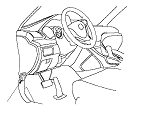
  1. If the system indicators stay on, connect the HDS to the data link connector (DLC) (A) located under the driver's side of the dashboard.
  1. Turn the ignition switch to ON (II).
  1. Make sure the HDS communicates with the vehicle and the EPS control unit. If it doesn't, troubleshoot the DLC circuit.
  1. Check the diagnostic trouble code (DTC) and note it. Then refer to the indicated DTC's troubleshooting, and do the appropriate troubleshooting procedure.
    NOTE:
    • The HDS can read the DTC, the current data, and other system data.
    • For specific operations, refer to the Help menu that came with the HDS.

How to Retrieve DTCs
  1. With the ignition switch in LOCK (0), connect the HDS to the data link connector (DLC) under the driver's side of the dashboard.
  1. Turn the ignition switch to ON (II).
  1. Make sure the HDS communicates with the vehicle and the EPS control unit. If it doesn't, troubleshoot the DLC circuit.
  1. Follow the prompts on the HDS to display the DTC(s) on the screen. After determining the DTC, refer to the DTC troubleshooting.
  1. Turn the ignition switch to LOCK (0).

How to Clear DTCs
  1. With the ignition switch in LOCK (0), connect the HDS to the data link connector (DLC) under the driver's side of the dashboard.
  1. Turn the ignition switch to ON (II).
  1. Make sure the HDS communicates with the vehicle and the EPS control unit. If it doesn't, troubleshoot the DLC circuit.
  1. Clear the DTC(s) by following the screen prompts on the HDS.
  1. Turn the ignition switch to LOCK (0).