Door Lock Knob Switch Test
|
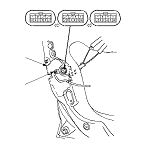
Driver's Door
-
-
Disconnect the 10P connector (A) from the actuator (B).
-
Check for continuity between the terminals.
-
There should be continuity between the No. 6 [No. 9] and No. 5 [No. 10] terminals when the door lock knob switch is in the LOCK position and no continuity when the switch is in the UNLOCK position.
-
There should be continuity between the No. 7 [No. 8] and No. 5 [No. 10] terminals when the door lock knob switch is in the UNLOCK position and no continuity when the switch is in the LOCK position.
[ ]: RHD model
-
If the continuity is not as specified, replace the door lock actuator.
|
|
|
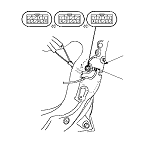
Front Passenger's Door
-
-
Disconnect the 10P connector (A) from the actuator (B).
-
Check for continuity between the terminals.
There should be continuity between the No. 8 [No. 7] and No. 10 [No. 5] terminals when the door lock knob switch in the UNLOCK position and no continuity when the switch is in the LOCK position.
[ ]: RHD model
-
If the continuity is not specified, replace the door lock actuator.
|
|
|
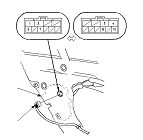
Rear Door with Security
-
-
Disconnect the 10P connector (A) from the actuator (B).
NOTE: The illustration shows the left rear door.
-
Check for continuity between the terminals.
There should be continuity between the No. 7 [No. 8] and No. 5 [No. 10] terminals when the door lock knob switch is UNLOCK position and no continuity when the switch is in the LOCK position.
[ ]: Right rear door
-
If the continuity is not as specified, replace the door lock actuator.
|
|