Front Seat Lumbar Support Replacement
Driver's Seat (For Some Models)
SRS components are located in this area.
Review the SRS component locations
and
the precautions and procedures
before doing repairs or service.
NOTE:
Put on gloves to protect your hands.
Take care not to kink the cable.
Take care not to tear the seams or damage the seat covers.
The driver's seat on the LHD model is shown; the one on the RHD model is symmetrical.
Remove the front seat.
Remove the seat-back cover and pad.
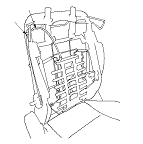
Remove the cable clamp (A) fastening the lumbar support cable (B).
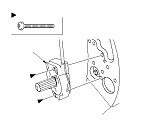
Remove the screws securing the lumbar support actuator (A).
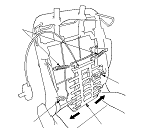
Remove the lumbar support (A).
-1.
While pulling the lower part of the lumbar support to one side of the seat back frame, release it from the lower wire (B).
-2.
Release an opposite side of the lumbar support from the other lower wire.
-3.
Release the upper part of the lumbar support from both upper springs (C).
Remove the upper springs.
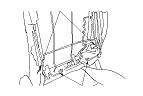
Release the lower wires (A) from both active head restraint links (B) of the seat-back frame.
Install the lumbar support in the reverse order of removal.