Steering Column Cover Removal/Installation

NOTE:
  • Put on gloves to protect your hands.
  • Take care not to scratch or damage the column covers.
  • Do not pry the cover surface with any tools.
  1. Adjust the steering column to full tilt down position and to the full telescopic pull position.
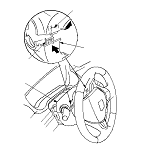
  1. Detach the clips fastening the column blind cover (A) from the upper column cover (B) by hand, and pull the pins (C) off the upper column cover.

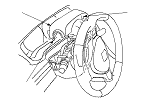
  1. Turn the steering wheel to left, and release the left tab (A) of the upper column cover (B) while pushing the lower column cover (C) from the front side.
    Carefully release the tabs, and note the hooks (D) may break when the upper column cover is pulled up too hard.
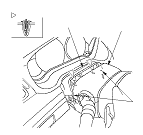
  1. Turn the steering wheel to right, and release the right tab of the upper column cover the same as the Step 3 .

  1. Remove the upper column cover (A) by lightly pulling it up while releasing both side hooks (B) of the cover.

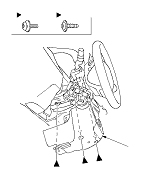
  1. Remove the three screws (A, B), then remove the lower column cover (C).
  1. Install the upper and lower column covers in the reverse order of removal, and push the hooks into place securely.