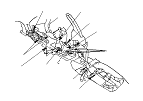
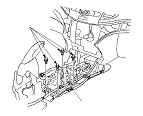
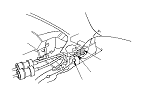
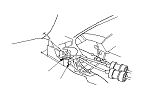
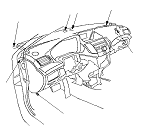
Dashboard/Steering Hanger Beam Removal/Installation

SRS components are located in this area. Review the SRS component locations and the precautions and procedures before doing repairs or service.
NOTE:
  • Put on gloves to protect your hands.
  • Take care not to scratch the dashboard, the body and the other related parts.
  • Take care not to bend the brackets.
  • Have an assistant help you when removing and installing the dashboard/steering hanger beam.
  • When removing components, use the trim tools or equivalent.
  1. Do the battery terminal disconnection procedure, then wait at least 3 minutes before beginning work.
  1. Remove these items:
Driver's side
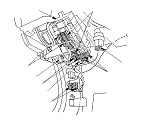
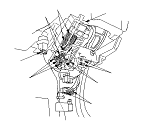
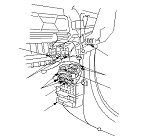
  1. From under the dash, disconnect the left engine compartment wire harness connectors (LHD model)/the right engine compartment wire harness connectors (RHD model) (A), the driver's door wire harness connector(s) (B), the roof wire harness connector(s) (C), and the left side wire harness connector (LHD model)/the right side wire harness connector (RHD model) (D), and disconnect the left engine compartment wire harness connectors (E) and the left side wire harness connectors (LHD model)/the right side wire harness connector (RHD model) (F) from the driver's under-dash fuse/relay box (G). Disconnect the inertia switch connector (H) on Europe models.
LHD model
RHD model

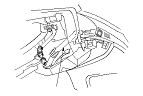
  1. From under the dash, disconnect the air hose (A), then remove it. LHD model is shown; RHD model is symmetrical.

Middle portion (shift lever portion)
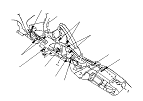
  1. Disconnect the floor wire harness connector (A) on some RHD models, the SRS unit connector (B), the parking brake switch connector (C), the yaw rate-lateral acceleration sensor connector (D), and if equipped, the USB adapter unit connector (E), and detach the wire harness clips (F). Using a TORX T30 bit, remove the ground bolt (G).
LHD model
RHD model

  1. A/T model: Remove the bolt, then remove the shift lever mount bracket (A).

Middle portion (passenger's side)
  1. From under the dash, disconnect the A/C wire harness connector (A), and the floor wire harness connector (B) on the LHD model. Detach the wire harness clip (C).
LHD model
RHD model

Passenger's side
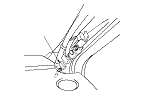
  1. Disconnect the antenna sublead connector (A). LHD model is shown; RHD model is symmetrical.

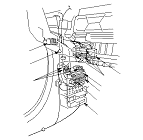
  1. From under the dash, disconnect the passenger's door wire harness connector (A), the right side wire harness connector(s) (LHD model)/the left side wire harness connectors (B) (RHD model), and the right engine compartment wire harness connectors (LHD model)/the left engine compartment wire harness connectors (RHD model) (C). Disconnect the dashboard wire harness connectors (D) and the audio wire harness connector (E) from the passenger's under-dash fuse/relay box (F). On RHD model, detach the harness clip (G).
  1. Detach all of the harness and the connector clips.
LHD model
RHD model

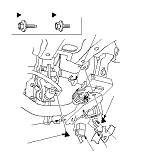
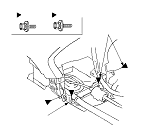
  1. Detach the harness clip (A) and the clip fastening the relay (B) from the brake pedal support member (C). Remove the bolts (D, E), then remove the member, and if equipped, disconnect the parking and back-up sensor control unit connector (F) and/or the headlight leveling control unit connector (G). LHD model is shown; RHD model is similar.

  1. Remove bolts (A, B), then remove the center joint bracket (C).

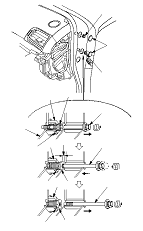
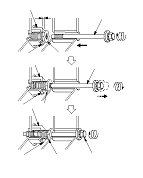
  1. Remove the special bolts (A) from outside the passenger's door. LHD model is shown; RHD model is symmetrical.
    -1.
    Remove the caps (B).
    -2.
    Loosen the special bolt until its threads have come off the side bracket (C) of the steering hanger beam. The bolt will be screwed into the inside threads of the collar bolt (D) by loosening the bolt. Because of the thread lock on the threads of the bolt, the bolt and the collar bolt will be fixed.
    -3.
    Loosen the bolt again to screw the collar bolt into the fixed space adjuster (E) until it is stopped by the stopper (F). This will provide a gap (G) between the collar bolt and the body.
    -4.
    Remove the bolts.

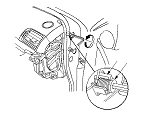
  1. Slightly screw the collar bolt (A) into the space adjuster (B) with 8 mm hexagonal wench. LHD model is shown; RHD model is symmetrical except the direction of screwing.
  1. If the collar bolts are not screwed fully into the fixed space adjuster when removing the special bolts, screw collar bolt into the fixed space adjuster in the same way as Step 14 .

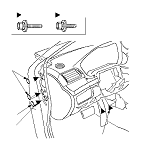
  1. From outside the driver's door, remove the caps (A), then remove the bolts (B, C) from outside the driver's door. LHD model is shown; RHD model is symmetrical.

  1. Lift up on the dashboard (A) to release it from the guide pins (B) and the center pin (C) on the dashboard from the grommet (D) on the body. Carefully remove the dashboard through the front door opening. Take care not to scratch the body with the collar nuts on the passenger's side. LHD model is shown; RHD model is symmetrical.
    NOTE: Do not rest the dashboard on its lower center cover opening, or it may be damaged. Lay it on its front or back.

  1. Install the dashboard in the reverse order of removal, and note these items:
    • Make sure the dashboard fits onto the guide pins correctly.
    • Before tightening the bolts, make sure the wire harnesses are not pinched.
    • Make sure the connectors are plugged in properly.
    • Before reinstalling the dashboard, be sure the collar bolt (A) on passenger's side can be screwed/unscrewed lightly by hand, and then screw all of them into the fixed space adjuster (B) until they contact the stoppers (C) by hand. Do not tighten them fully with any tools.
    • Before reinstalling the dashboard, try to screw the special bolt (D) into the loosened collar bolt. If the collar bolt is not unscrewed by screwing the special bolt, replace this special bolt with a new one.
    • After setting the dashboard on the body, reinstall all of the mounting bolts to the dashboard, tighten the driver's side bracket to the specified torque, then torque the special bolt on the passenger's side. First screw the special bolt into the collar bolt, they will be fixed because of the thread lock on the bolt. Continue tightening the bolt with the collar bolt, they are loosened from the fixed space adjuster until the collar bolt contacts the inside face of the body. Then tighten the bolts again to the specified torque.
    • Apply medium strength liquid thread lock to the bolts securing the center joint bracket and the dashboard before reinstallation.
    • After tightening the dashboard mounting bolts, tighten the center joint bracket mounting bolts, and then tighten the center frame mounting bolts.
    • Check for any DTCs that may have been set during repairs, and clear them.
Special bolt tightening on passenger's side