|
NOTE:
-
Remove these items:
-
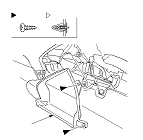
Remove the screws, and pull out the side pocket (A) to detach the clip, then remove it. The driver's side pocket is shown; the passenger's side pocket is similar.
-
Install the cover in the reverse order of removal, and note these items:
-
If the clips are damaged or stress-whitened, replace them with new ones.
-
Push the clips into place securely.
|
|