|
NOTE:
-
Take care not to scratch the trim and panels.
-
When removing components, use the trim tools or equivalent.
-
LHD model is shown; RHD model is symmetrical.
-
Remove these items:
-
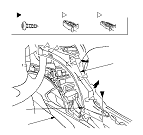
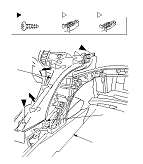
Remove the driver's center trim (A) or the passenger's center trim (B).
|
-1.
|
Remove the screw(s) (C).
|
|
-2.
|
Gently pull the lower portion of the trim up to detach the clip (D) and to release the hook (E) from the edge of the center console (F).
|
|
-3.
|
Pull out the trim to detach the clips (G, H).
|
-
Install the trim in the reverse order of removal, and note these items:
-
If the clips are damaged or stress-whitened, replace them with new ones.
-
Push the clips into place securely.
|
Driver's side
Passenger's side
|