Dashboard Center Lower Cover Removal/Installation

SRS components are located in this area. Review the SRS component locations and the precautions and procedures before doing repairs or service.
NOTE:
  • Take care not to scratch the dashboard and its related parts.
  • When removing components, use the trim tools or equivalent.
  • LHD model is shown; RHD model is symmetrical.
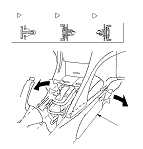
  1. Detach the clips (A, B, C) by pulling the front edges of the center console (D) out from both sides, then release both front portions of the console from the dashboard as needed.

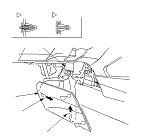
  1. Remove the driver's dashboard center lower cover (A).
    -1.
    Gently pull the rear edge of the cover to detach the clips (B, C).
    -2.
    Pull up the rear portion of the cover to release the hook (D) from the rear heater duct (E).
    -3.
    Pull the cover rearward to release the hook (F) from the heater unit (G).

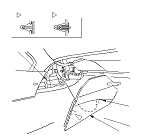
  1. Remove the passenger's dashboard center lower cover (A).
    -1.
    Gently pull the rear edge of the cover to detach the clip (B), and detach the farther clip (C) at the front of the cover.
    -2.
    Pull up the cover to release the hook (D) from the rear heater duct (E).
  1. Install the cover in the reverse order of removal, and note these items:
    • If the clips are damaged or stress-whitened, replace them with new ones.
    • Push the clips into place securely.
    • Make sure the hooks are set properly.