Center Console Removal/Installation

NOTE:
  • Put on gloves to protect your hands.
  • Take care not to scratch the front seat, the dashboard, and related parts.
  1. Remove these items:
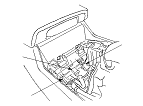
  1. Disconnect the rear accessory power socket connector (A), and if equipped, the auxiliary jack assembly connector (B) and the USB jack connector (C).

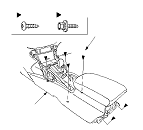
  1. Remove the screws (A) and the bolts (B) securing the center console (C). LHD model is shown; RHD model is symmetrical.

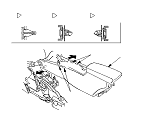
  1. Remove the center console (A). LHD model is shown; RHD model is symmetrical.
    -1.
    Detach the clips (B, C, D) by pulling the front edges of the center console out from both sides.
    -2.
    Pull up the console to release the hooks (E).
    -3.
    With rear ventilation: Pull the console rearward to disconnect both the side ducts (F).
Without rear ventilation
With rear ventilation
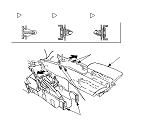
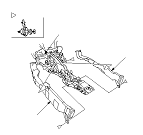
  1. With rear ventilation: If necessary, release the clips, then remove the driver's rear ventilation duct (A) and the passenger's rear ventilation duct (B) from the heater unit (C). LHD model is shown; RHD model is symmetrical.
  1. Install the console in the reverse order of removal, and note these items:
    • Make sure each connector is plugged in properly.
    • If the clips are damaged, replace them with new ones.
    • Push the clips and the hooks into place securely.