HFT System Symptom Troubleshooting - The HFT messages cannot be heard or are weak

The HFL messages cannot be heard or are weak
  1. Turn the ignition switch to ON (II).
  1. Check that the audio system is operating normally and the speaker sound levels from different audio sources (AM, FM, CD, TA, Navigation, etc.).
Does the audio system work normally and is the audio output from the speaker normal when playing various audio sources?
YES -
Go to Step 3 .
NO -
Refer to the audio system symptom troubleshooting.■
  1. Press the HFT talk button.
Does the audio system mute when HFL messages are being played?
YES -
Go to Step 4 .
NO -
Go to Step 9 .
  1. Turn the ignition switch to LOCK (0).
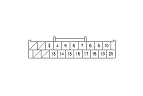
  1. Disconnect audio unit connector B (20P) and the Hands Free Telephone control unit 28P connector.
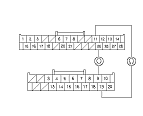
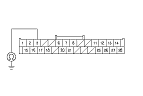
  1. Check for continuity between Hands Free Telephone control unit 28P connector terminals No. 11 and No. 25 and audio unit connector B (20P) terminals No. 19 and No. 9.
Is there continuity?
YES -
Go to Step 7 .
NO -
Open in the wire(s) between Hands Free Telephone control unit and audio unit. Replace the affected harness.■

  1. Check for continuity between body ground and audio unit connector B (20P) terminals No. 19 and No. 9 individually.
Is there continuity?
YES -
Short to body ground in the wire(s) between Hands Free Telephone control unit and audio unit. Replace the affected shielded harness.■
NO -
Go to Step 8 .

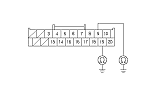
  1. Check for continuity between the terminals of audio unit connector B (20P) according to the table.
    From terminal
    To terminal
    B19
    B9, B10
    B9
    B10

Is there continuity?
YES -
Short in the wire(s) between Hands Free Telephone control unit and audio unit. Replace the appropriate harness.■
NO -
Substitute a known-good Hands Free Telephone control unit and recheck. If the symptom goes away, replace the original Hands Free Telephone control unit. If the symptom does not go away, replace the audio unit with navigation system, without navigation system.
  1. Press the HFT talk button.
Does the audio-HVAC subdisplay (audio/navigation switch panel display or center display unit) the HFT menu and the subdisplay show HandsFreeLink when pressing the HFT talk button?
YES -
Go to Step 10 .
NO -
Go to Step 14 .
  1. Turn the ignition switch to LOCK (0).
  1. Disconnect the Hands Free Telephone control unit 28P connector and audio unit connector B (20P).

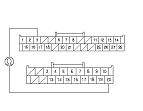
  1. Check for continuity between Hands Free Telephone control unit 28P connector terminal No. 3 and audio unit connector B (20P) terminal No. 20.
Is there continuity?
YES -
Go to Step 12 .
NO -
Repair open in the wire between Hands Free Telephone control unit and audio unit.■

  1. Check for continuity between body ground and Hands Free Telephone control unit 28P connector terminal No. 3.
Is there continuity?
YES -
Repair short to body ground in the wire between Hands Free Telephone control unit and audio unit.■
NO -
Substitute a known-good Hands Free Telephone control unit and recheck. If symptom goes away, replace the original Hands Free Telephone control unit. If the symptom does not go away, replace the audio unit with navigation system, without navigation system.
  1. Turn the ignition switch to LOCK (0).
  1. Disconnect the Hands Free Telephone control unit 28P connector and HFT switch 7P connector.

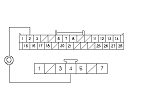
  1. Check for continuity between Hands Free Telephone control unit 28P connector terminal No. 2 and HFT switch 7P connector terminal No. 4.
Is there continuity?
YES -
NO -
Repair open in the wire between Hands Free Telephone control unit and HFT switch.■