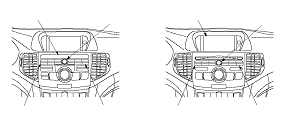
Audio System Self-diagnostic Function

The audio system has a self-diagnostic function.
NOTE:
  • Not all self-diagnostic functions appear on all models.
  • There may be other self-diagnostic functions that are for factory use only.
How to Use the Audio System Self-diagnostic Function
  1. Turn the ignition switch to ON (II). Turn the audio unit off.
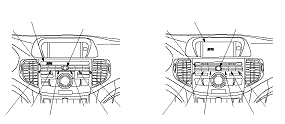
  1. Push and hold the No. 1 and No. 6 buttons. While holding the buttons, push the VOL knob to on. Release the buttons and the self-diagnostic function begins.
  1. By pressing a preset button, the input will trigger the diagnostic mode that is assigned to that preset switch.
    No. 2 button
    Audio button, knob, and remote switch detection: Allows individual manual selection of all audio panel knobs, buttons, and remote switches to verify if they are functional. When properly detected, the applied knob button, or remote switch name and/or value will be displayed. To exit this mode, go to Step 1 .
    No. 3 button
    Entire LCD lighting/light-out mode: Turns on/off the entire LCD to show the presence or absence of an LCD failure.
    No. 4 button
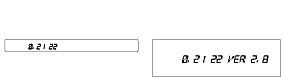
    Illumination level indication mode: Indicates the duty cycle for the illumination dimmer control of the gauge assembly.
    Gauge dimmer control values:
    Headlights off: OFF
    Headlights on: 01 (max low) through 22 (max high)
    No. 5 button
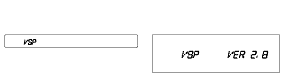
    Vehicle speed pulse indication mode: Indicates the Vehicle speed pulse.
    AM/FM or FM button (Push and hold 5 sec.)
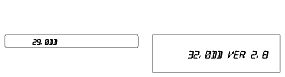
    Reception level check mode: Indicates the reception level. When entering the reception level check mode, the AM/FM button or FM button is used to change the main/sub antenna.


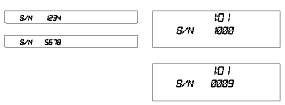
How to Obtain the Audio Unit Serial Number

NOTE: The audio unit will display the letter U with the first four digits of the serial number (example U1234). The display then changes and displays the letter L and the last four digits of the serial number (example L5678). Use all eight digits as the serial number when using the interactive network iN to get the 5 digit anti-theft code.
  1. The self-diagnostic function ends when you turn the audio unit off or turn the ignition switch to LOCK (0).
    NOTE: Any other diagnostic screens shown are for factory use only.
Serial Number


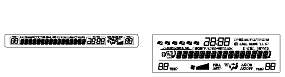
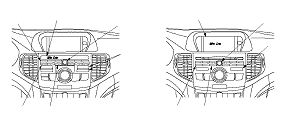
Display Specifications


Without Navigation
To check AM or FM reception, press and hold the applicable band button for 5 seconds, then release. The reception level is displayed in decibels (db). You can check the reception with or without the amplifier. Press the A. SEL button to toggle between turning the amplifier on and off. The amplifier is on when the letter A appears next to the db indication. You can change the station with the tuner button to check the reception level of any specific radio station. Compare this value with a known-good vehicle to check the audio unit reception.
With Navigation
To check FM reception, press and hold the AM/FM button for 5 seconds, the release. To check the AM band, press and hold the AM/FM button for another five seconds, then release. The reception level is displayed in decibels (db). You can check the reception with or without the amplifier. Press the A. SEL button to toggle between turning the amplifier on and off. The amplifier is on when the letter A appears next to the db indication. You can change the station with the tuner button to check the reception level of any specific radio station. Compare this value with a known-good vehicle to check the audio unit reception.

Speaker Check Mode
NOTE:
  • Not all self-diagnostic functions appear on all models.
  • There may be other self-diagnostic functions that are for factory use only.
  1. Turn the ignition switch to ON (II). Turn the audio unit off.
  1. Push and hold the No. 1 and No. 3 buttons. While holding the buttons, push the VOL knob to on. Release the buttons and the speaker check mode begins. A test tone should sound from one speaker.
    NOTE: Make sure the volume is set to a normal or slightly higher than normal volume and set the balance and fader to the center position.
  1. Each time you press the SKIP button, the test moves to the next the speaker in the order listed.

Display Specifications

With Premium Audio System
( ) is pressed:
(1)→(2)→(3)→(4)→(5)→(6)→(7)→(8)→(9)
( ) is pressed:
(1)→(6)→(6)→(6)→(6)→(5)→(4)→(3)→(2)
( ) is pressed:
(1)→(2)→(3)→(4)→(5)
( ) is pressed:
(1)→(5)→(4)→(3)→(2)


With Premium Audio System

Speaker
Displayed Segments
Remarks
(1)
Left front door speaker and tweeter
SPK FR-L
You should hear a low frequency tone
(2)
Front center speaker
SPK CNTR
You should hear a low frequency tone
(3)
Right front door speaker and tweeter
SPK FR-R
You should hear a low frequency tone
(4)
Right rear door speaker
SPK ST-R
You should hear a low frequency tone
(5)
Right rear speaker
SPK RR-R
You should hear a low frequency tone
(6)
Subwoofer
SPK SUBW
You should hear a low frequency tone
(7)
Left rear speaker
SPK RR-L
You should hear a low frequency tone
(8)
Left rear door speaker
SPK ST-L
You should hear a low frequency tone
(9)
All speakers
SPK ALL
  • You should hear a low frequency tone
  • The subwoofer does not sound a tone


Without Premium Audio System

Speaker
Displayed Segments
Remarks
(1)
Left front door speaker and tweeter
SPK FR-L
You should hear a low frequency tone
(2)
Right front door speaker and tweeter
SPK FR-R
You should hear a low frequency tone
(3)
Right rear speaker
SPK RR-R
You should hear a low frequency tone
(4)
Left rear speaker
SPK RR-L
You should hear a low frequency tone
(5)
All speakers
SPK ALL
  • You should hear a low frequency tone
  • The subwoofer does not sound a tone

NOTE: Any other diagnostic screens are shown for factory use only.

  1. The speaker check mode ends when you turn the audio unit off or turn the ignition switch to LOCK (0).

Communication Connection Check Mode
NOTE:
  • Not all self-diagnostic functions appear on all models.
  • There may be other self-diagnostic functions that are for factory use only.
  1. Turn the ignition switch to ON (II). Turn the audio unit off.
  1. Push and hold the No. 1 and No. 6 buttons. While holding the buttons, push the VOL knob to on. Release the buttons.
  1. Press the No. 6 button, and the communication connection check mode begins.
  1. Each time you press the No. 6 button, the communication connection state is displayed in the following order.
    NOTE: If the switch panel display or the center display is blank in all headlight positions, or blank only when the headlights are tuned on, check for B-CAN DTCs.

    Display Specifications (With navigation system)

    Displayed Segments
    State
    Remarks
    DSP OK
    The audio-HVAC subdisplay unit or the audio-HVAC display unit is connected.
    DSP NG
    The audio-HVAC subdisplay unit or the audio-HVAC display unit is not connected.
    AC OK
    The climate control unit is connected.
    AC NG
    The climate control unit is not connected.
    AMP OK 00
    The stereo amplifier is connected.
    Applicable to the premium audio system
    AMP OK 04
    The stereo amplifier is connected (Error has occurred four times in the past).
    Applicable to the premium audio system
    AMP NG
    The stereo amplifier is not connected.
    Applicable to the premium audio system


    Display Specifications (Without navigation system)

    Displayed Segments
    State
    Remarks
    02 183
    The navigation unit is not connected.
    ANT ———
    The antenna amplifier is connected.
    ANT CHK
    The antenna amplifier is not connected.
    AMP ———
    The stereo amplifier is connected.
    Applicable to the premium audio system.
    AMP CHK
    The stereo amplifier is not connected.
    Applicable to the premium audio system.
    AMP 0100
    The stereo amplifier is connected.
    Applicable to the premium audio system.
    AMP NG 04
    The stereo amplifier is not connected (error has occurred four times in the past).
    Applicable to the premium audio system.
    AC OK
    The climate control unit is connected.
    AC NG
    The climate control unit is not connected.
    CMP OK
    The electrical compass unit is connected.
    Applicable to the premium audio system.
    CMP NG
    The electrical compass unit is not connected.
    Applicable to the premium audio system.
    LCD 0100
    The audio-HVAC display unit is connected.
    LCD NG
    The audio-HVAC display unit is not connected.

    NOTE: Any other diagnostic screens are shown for the manufacturer's purpose only.

  1. The self-diagnostic function ends when you turn the audio unit off or turn the ignition switch to LOCK (0).