|
Audio remote switch does not work properly
NOTE:
-
|
Is the audio remote switch OK?
|
-
Turn the ignition switch to ON (II).
-
Turn on the audio unit and check the audio unit operation (volume up, volume down, CH (UP), CH (DOWN), MODE).
|
Is the audio unit operation OK?
|
|
YES
|
-
|
Operation is normal.■
|
|
NO
|
-
|
|
-
Turn the ignition switch to LOCK (0).
-
Remove the audio unit:
-
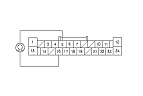
Disconnect audio unit connector A (24P).
-
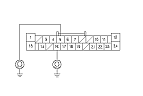
Reconnect the audio remote switch, and measure the resistance between the audio unit connector A (24P) terminals No. 5 and No. 16 as specified in the table.
AUDIO REMOTE SWITCH TABLE
|
Button held down
|
VOL DOWN
|
VOL UP
|
CH (−)
|
CH (+)
|
MODE
|
(NONE)
|
|
Resistance
|
about 100 Ω
|
about 357 Ω
|
about 775 Ω
|
about 1.7 kΩ
|
about 3.7 kΩ
|
about 10 kΩ
|
|
YES
|
-
|
|
|
NO
|
-
|
Repair short or high resistance in the circuit between the audio unit and the audio remote switch. If the wires are OK,
replace the cable reel.
■
|
|