Audio System Symptom Troubleshooting - Volume does not change
Volume does not change
NOTE:
Check the vehicle battery condition first.
Set the fader and balance positions to the center.
Check the connectors for poor connections or loose terminals.
Turn the ignition switch to ON (II).
Turn on the audio unit and check for sound in each mode (AM, FM, and CD).
Is the sound normal?
YES
-
Go to
Step 3
.
NO
-
Go to no sound is heard from speaker(s) with premium audio system
,
without premium audio system.
■
Operate the volume knob to see if the volume changes.
Does the volume change?
YES
-
Operation is normal.■
NO
-
With navigation system: Go to
Step 4
.
Without navigation system:
Substitute a known-good audio unit
and recheck.
If the symptom/indication goes away, replace the original audio unit.
■
Turn the ignition switch to LOCK (0).
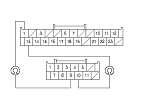
Disconnect audio switch panel 24P connector and audio unit connector C (12P).
Check for continuity between audio/navigation switch panel 24P connector and audio unit connector C (12P) as shown.
Is there continuity?
YES
-
Go to
Step 7
.
NO
-
Repair open in the wire(s) between the audio unit and audio/navigation switch panel.■
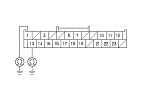
Check for continuity between audio/navigation switch panel 24P connector and body ground as shown.
Is there continuity?
YES
-
Repair short to body ground in the wire(s) between the audio unit and audio/navigation switch panel.■
NO
-
Go to
Step 8
.
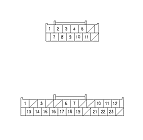
Check for continuity between the terminals of audio unit connector C (12P) and audio/navigation switch panel 24P connector according to the table.
From terminal
To terminal
Audio unit connector
Audio/navigation switch panel connector
C4 (GRY)
No. 1 (WHT), No. 13 (BLK)
Is there continuity between any of the terminals?
YES
-
Repair short in the wire(s) between the audio unit and audio/navigation switch panel (replace the appropriate shielded harness).■
NO
-
Substitute a known-good audio unit and recheck. If the symptom/indication goes away,
replace the original audio unit.
If the symptom is still present, substitute a known-good audio/navigation switch panel and recheck. If the symptom/indication goes away,
replace the original audio/navigation switch panel.
■