|
Audio unit button illumination does not work (without navigation system)
NOTE:
-
Turn the ignition switch to ON (II).
-
Turn the combination lighting switch to the parking light position.
-
Check the illumination of the audio unit buttons.
|
Are the buttons illuminated?
|
|
YES
|
-
|
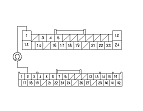
Intermittent problem; the audio unit is OK at this time. Check for loose or poor connections at audio unit connector A (24P).■
|
|
NO
|
-
|
|
-
Check the illumination of several other buttons not related to the audio system.
|
Are the buttons illuminated?
|
|
YES
|
-
|
|
|
NO
|
-
|
Troubleshoot the interior lights. Start by checking the No. 6 (7.5 A) fuse in the passenger's under-dash fuse/relay box. If the fuse is OK, check for an open in the wire between the passenger's under-dash fuse/relay box and audio unit.■
|
-
Turn the ignition switch to LOCK (0).
-
Disconnect audio unit connector A (24P).
NOTE: Eject all the CDs before removing the audio unit and CD changer to prevent damaging the CD player's load mechanism.
-
-
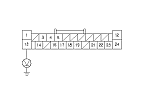
Check for continuity between audio unit connector A (24P) terminal No. 1 and the gauge control module 32P connector terminal No. 2.
|
YES
|
-
|
|
|
NO
|
-
|
Repair open in the wire between the gauge control module and the audio unit.■
|
-
Turn the ignition switch to ON (II).
|