|
Audio unit power switch will not turn off
NOTE:
-
Check the vehicle battery condition first.
-
Check the connectors for poor connections or loose terminals.
-
Check for aftermarket accessories plugged info the vehicle's accessory power sockets.
-
Turn the ignition switch to ON (II).
-
Push the power switch off or turn the ignition switch to LOCK (0) to see if the audio unit turns off.
|
Does the audio unit turn off?
|
|
YES
|
-
|
|
|
NO
|
-
|
Replace the audio unit:■
|
-
Push the power switch on, then turn the ignition switch to LOCK (0).
|
Does the audio unit turn off?
|
|
YES
|
-
|
Operation is normal.■
|
|
NO
|
-
|
|
-
NOTE: Eject all the CDs before disconnecting the audio unit and CD changer to prevent damaging the CD player's load mechanism.
-
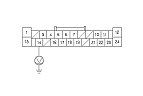
Measure the voltage between the terminal No. 14 of audio unit connector A (24P) and body ground.
|
Is there battery voltage?
|
|
YES
|
-
|
Check for short to power on the PUR wire.■
|
|
NO
|
-
|
|
|