|
Audio unit power switch will not turn on (No information display and no sound)
NOTE:
-
Turn the ignition switch to ON (II).
-
Push the power switch on to see if audio unit turns on.
|
Does the audio unit display operate properly, and does the audio unit sound normal?
|
|
YES
|
-
|
Intermittent failure, the system is OK at this time.■
|
|
NO
|
-
|
|
-
Push the power switch on, then turn the ignition switch to LOCK (0).
-
Check the No. 15 (10 A) fuse in the under-hood fuse/relay box and the No. 18 (7.5 A) fuse in the driver's under-dash fuse/relay box.
|
YES
|
-
|
|
|
NO
|
-
|
Replace the fuse, and recheck.■
|
-
|
Are they connected properly?
|
|
YES
|
-
|
|
|
NO
|
-
|
Repair poor connections and reconnect the connectors, and recheck the function.■
|
-
Disconnect audio unit connector A (24P).
NOTE: Eject all the CDs before disconnecting the audio unit and CD changer to prevent damaging the CD player's load mechanism.
-
Turn the ignition switch to ON (II).
-
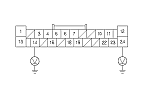
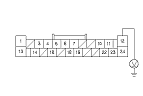
Measure the voltage between the terminals No. 14 and No. 24 of audio unit connector A (24P) and body ground.
|
Is there battery voltage?
|
|
YES
|
-
|
|
|
NO
|
-
|
Repair open in the wire(s) between the No. 15 (10 A) fuse in the under-hood fuse/relay box, the No. 18 (7.5 A) fuse in the driver's under-dash fuse/relay box and the audio unit.■
|
-
Reconnect audio unit connector A (24P).
|