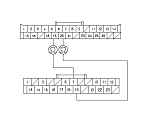
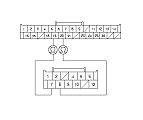
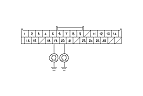
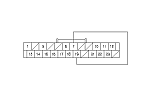
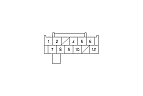
Climate Control-Audio Communication Line Circuit Troubleshooting
-
Disconnect climate control unit connector A (28P) and the audio/navigation switch panel 24P connector (with navigation) or center display unit 12P connector (without navigation).
-
Check for continuity between the following terminals of climate control unit connector A (28P) and the audio/navigation switch panel 24P connector or center display unit 12P connector.
|
With navigation
|
|
28P:
|
24P:
|
|
No. 19
|
No. 7
|
|
No. 20
|
No. 19
|
|
28P:
|
12P:
|
|
No. 19
|
No. 7
|
|
No. 20
|
No. 8
|
|
YES
|
-
|
|
|
NO
|
-
|
Repair open in the wire between climate control unit connector A (28P) and the audio/navigation switch panel 24P connector or center display unit 12P connector.■
|
|
|
-
Check for continuity between body ground and climate control unit connector A (28P) No. 19 and No. 20 terminals individually.
|
YES
|
-
|
Repair short to body ground in the wire between climate control unit connector A (28P) and the audio/navigation switch panel 24P connector or center display unit 12P connector.■
|
|
NO
|
-
|
|
-
Reconnect climate control unit connector A (28P).
|
|
-
With navigation: Connect the audio/navigation switch panel 24P connector No. 7 and No. 19 terminals with a jumper wire. Without navigation: Connect the center display unit 12P connector No. 7 and No. 8 terminals with a jumper wire.
-
Turn the ignition switch to ON (II).
-
Press and hold the DEF button and OFF button.
|
Is the DEF button LED blinking?
|
|
|