Parking Brake Inspection and Adjustment

Inspection
  1. Pull the parking brake lever (A) with 196 N (20 kgf, 44 lbf) of force to fully apply the parking brake. The parking brake lever should be locked within the specified number of clicks.
    Lever locked clicks:
    Rear disc brake type:
    6 to 8
    Rear drum in disc brake type:
    5 to 7

  1. If the number of lever clicks is not as specified, adjust the parking brake.
    NOTE:
    • Rear drum in disc brake type: Minor parking brake lever adjustments (1 to 2 clicks) can be made with the adjusting nut. If a larger adjustment is required, follow the major adjustment procedure using the adjuster at the parking brake drum.
    • After installing new parking brake shoes and/or new brake disc/drum, make sure you drive the vehicle for ‘‘break-in''.

Adjustment - Rear disc brake type
  1. Release the parking brake lever fully.
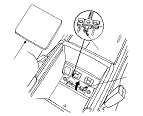
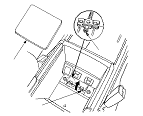
  1. Remove the console box mat (A) then open the lid (B).
    NOTE: It is easier to use packing tape to remove the console box mat.
  1. Loosen the parking brake adjusting nut (C).

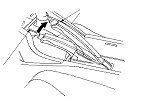
  1. Make sure the parking brake lever (A) on the rear brake caliper contacts the arm (B).
    NOTE: The parking brake lever will contact the arm when the parking brake adjusting nut is loosened.
  1. Pull the parking brake lever 1 click.
  1. Tighten the parking brake adjusting nut until the parking brakes drag slightly when the rear wheels are turned.
  1. Release the parking brake lever fully, and check that the parking brakes do not drag when the rear wheels are turned. Readjust if necessary.
  1. Make sure the parking brake lever within the specified number of clicks (6 to 8 clicks).
  1. Close the lid, then install the console box mat.

Minor Adjustment - Rear drum in disc brake type
  1. Release the parking brake lever fully.
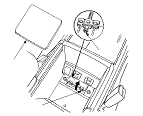
  1. Remove the console box mat (A) then open the lid (B).
    NOTE: It is easier to use packing tape to remove the console box mat.
  1. Pull the parking brake lever 1 click.
  1. Tighten the parking brake adjusting nut (C) until the parking brakes drag slightly when the rear wheels are turned.
  1. Release the parking brake lever fully, and check that the parking brakes do not drag when the rear wheels are turned. Readjust if necessary.
  1. Make sure the parking brake lever within the specified number of clicks (5 to 7 clicks).
  1. Close the lid, then install the console box mat.

Major Adjustment (to be done when replacing parking brake shoes) - Rear drum in disc brake type
  1. Release the parking brake lever fully.
  1. Remove the console box mat (A) then open the lid (B).
    NOTE: It is easier to use packing tape to remove the console box mat.
  1. Loosen the parking brake adjusting nut (C).
  1. Remove the rear wheels.

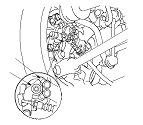
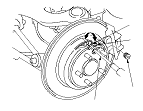
  1. Remove the access plug (A).
  1. Turn the ratchet teeth (B) on the adjuster assembly (C) with a flat-tip screwdriver (D) until the shoes lock against the parking brake drum. Then back off the adjuster 8 clicks, and install the access plug.
  1. Do the minor adjustment procedure.
  1. Clean the mating surfaces of the brake disc/drum and the inside of the wheel, then install the rear wheels.
  1. Close the lid, then install the console box mat.